Advertisement

How Google Advertising Boosts YouTube Video Reach Fast

es1.bahasberita.com – To promote your YouTube videos using Google Ads, start by linking your YouTube channel or creator’s videos to your Google Ads account. Next, select an appropriate video campaign type such as Demand Generation, Masthead, or Shorts ads, and choose eligible formats like skippable in-stream or bumper ads. Then, define your targeting parameters based on demographics and interests, set your budget and bidding strategy, and launch the campaign. Finally, monitor key metrics through Google Ads to optimize performance and maximize video exposure.

Advertisement

In today’s digital landscape, combining the power of YouTube and Google Ads offers creators and marketers unparalleled opportunities to amplify video reach and engagement. With YouTube’s expansive audience and the precise targeting abilities of Google Ads, promoting videos has become both an art and a science. Understanding how to navigate this ecosystem effectively can drastically increase your content’s visibility and enhance viewer interaction, critical for channel growth and monetization.

This comprehensive guide delves deep into every essential step from linking your YouTube channel to creating and optimizing ad campaigns that align with your goals—whether that’s brand awareness, conversions, or boosting organic views. You’ll gain practical insights into campaign types, ad formats, targeting options, and troubleshooting strategies informed by real-world experience and authoritative sources. By following this tutorial, you can confidently manage video promotions that not only drive traffic but also ensure compliance with YouTube’s policies and Google’s transparency standards.

Let’s embark on this step-by-step tutorial to unlock the full potential of promoting your YouTube videos via Google Ads in 2025, enabling you to reach the right audience with the right message at the right time.

Prerequisites for Promoting YouTube Videos via Google Ads

Before launching any video promotion campaign, it’s critical to set up the foundation correctly. Ensure you have these prerequisites in place to avoid common pitfalls and streamline your advertising journey.

A Google Ads Account Set Up and Funding Ready

  • Create or verify an active Google Ads account at ads.google.com.
  • Ensure billing is configured with valid payment methods to avoid interruptions.
  • Familiarize yourself with the Google Ads interface as it will be your primary management tool.
  • A YouTube Channel with Uploaded Videos

  • Your channel must be fully set up with videos uploaded and publicly available or unlisted.
  • Only videos from channels you own or have permission to promote can be linked to Google Ads.
  • Permissions for Promoting Third-party Videos

  • If promoting videos from creators other than yourself, obtain explicit permissions or agreements.
  • YouTube requires proper authorization to link external channels to your Google Ads account for ad purposes.
  • Clear Campaign Goals and Budget Understanding

  • Define your primary objective: brand exposure, website conversions, app installs, or lead generation.
  • Set a realistic advertising budget considering campaign duration and expected reach.
  • Understanding goals upfront guides campaign type and bidding choices.
  • Additional Tools and Access

  • Access to YouTube Studio for video metrics to measure campaign impact post-launch.
  • Optional integration with Google Analytics for deeper audience insights.
  • Necessary account permissions—campaign setup typically requires admin or standard user roles.
  • Preparing adequately on these fronts can save hours of troubleshooting later and maximize your Google Ads YouTube video promotion effectiveness.

    Step 1: Link Your YouTube Channel or Video to Your Google Ads Account

    Linking your YouTube channel to Google Ads is the foundational step that enables video ad campaigns and detailed performance tracking.

    Advertisement

    How to Link Your YouTube Channel to Google Ads

  • Sign in to your Google Ads account.
  • Navigate to “Tools & Settings” > “Setup” > “Linked accounts.”
  • Locate “YouTube” under the list of available integrations.
  • Click “Details” and then “Link channel.”
  • Enter your YouTube channel URL or channel ID.
  • Submit the request. The owner of the YouTube channel will receive a notification to accept the link.
  • Typically, the linking user must have permissions on both accounts to authorize integration. This process allows the Google Ads account to access video assets and usage stats from YouTube Studio.

    Permissions Needed and Creator Authorization

  • Channel owners must grant permission for the Google Ads account to access their channel data.
  • Creators can manage these permissions in YouTube Studio under “Settings” > “Permissions.”
  • Only approved connections ensure compliance with YouTube’s ad policies.
  • Limits on Linking

  • A Google Ads account can link up to 10,000 YouTube channels.
  • Conversely, each YouTube channel can be linked to a maximum of 300 Google Ads accounts.
  • Exceeding these limits can result in linking errors or disabled options.
  • Screenshot Reference:

    In Google Ads, under Linked Accounts interface, the YouTube channel linking popup shows the input field for URL and permission status

    Time Estimate: Approximately 5-10 minutes depending on authorization speed.

    Step 2: Choose the Right Campaign Type and Set Clear Goals

    Selecting the appropriate Google Ads campaign type matched to your video promotion objectives ensures the best chance of success.

    Overview of Google Ads Campaign Types for Video

  • Demand Generation Campaigns: Focus on broad awareness across YouTube and Google Display Network, useful for initial exposure.
  • Masthead Ads: Premium video placements on YouTube homepage (desktop and mobile), ideal for massive reach and brand awareness.
  • In-Stream Ads (Skippable & Non-skippable): Play before or during other videos, ensuring targeted exposures with options for engagement.
  • – Skippable ads allow viewers to skip after 5 seconds; metrics include view-through rates.
    – Non-skippable ads must be watched fully; good for brief, impactful messaging.

  • Bumper Ads: 6-second non-skippable ads for quick brand impressions.
  • YouTube Shorts Ads: Vertical, short-form video ads optimized for short-video viewers.
  • Selecting Campaign Goals

    Choosing your campaign objective directs available settings and bidding strategies. Common goals include:

  • Brand Awareness & Reach: Maximize visibility using Masthead or Demand Gen.
  • Product or Website Conversions: Drive traffic to landing pages or e-commerce with in-stream ads.
  • Video Views & Engagement: Increase watch time and channel subscriptions.
  • App Installs: Promote app downloads through video campaigns linked to the app store.
  • Setting Targeting Parameters

  • Geo-location: Target users by country, state, city, or custom radius.
  • Demographics: Age, gender, household income, parental status.
  • Interests and Behaviors: Based on YouTube user behaviors and Google’s affinity/market segments.
  • Be sure your campaign goal matches your selected type to avoid misused targeting or wasted budget.

    Time Estimate: 10-15 minutes to configure proper campaign type and goal settings.

    Step 3: Select Video Ad Formats Eligible for Your Campaign

    Choosing the right video ad format affects viewer engagement and campaign success rates.

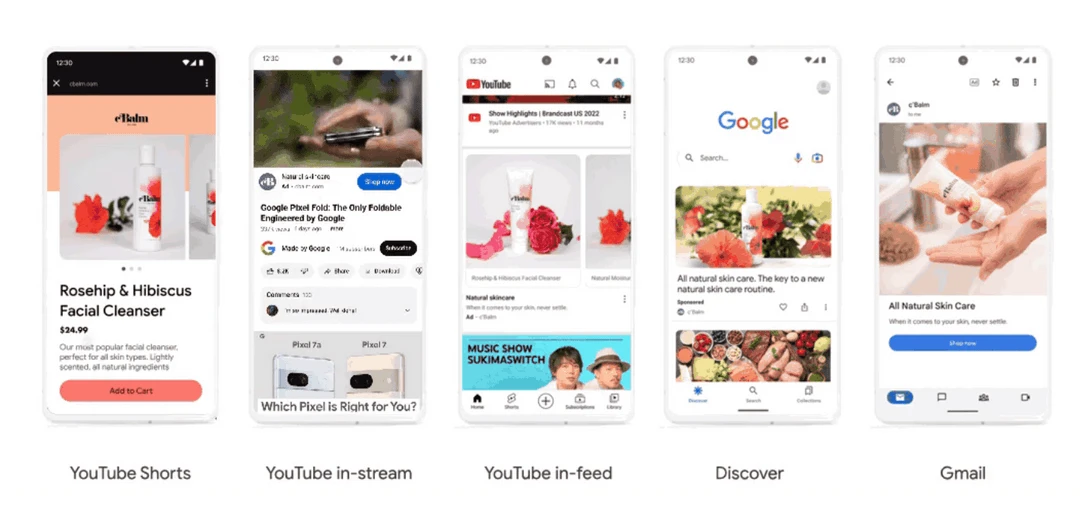
    Common Video Ad Formats and Their Use Cases

  • Skippable In-Stream Ads: Appear before/during videos; viewers can skip after 5 seconds.
  • Non-Skippable In-Stream Ads: Last between 15 to 20 seconds and force viewer attention.
  • Bumper Ads: Short 6-second clips designed for brand recall.
  • In-Feed Video Ads: Promoted videos appearing in YouTube search results and homepage feeds.
  • YouTube Shorts Ads: Designed specifically for vertical content consumption on Shorts feeds.
  • Finding Eligible Ad Formats within Google Ads

  • Create a new Video campaign.
  • Google Ads automatically filters ad formats available based on your campaign goal.
  • Formats unavailable for specific goals will be grayed out or hidden.
  • Uploading or Selecting Videos

  • Choose from your linked YouTube channel video library.
  • Ensure your videos meet ad specs (resolution, length, aspect ratio).
  • If needed, upload new content via YouTube Studio before campaign setup.
  • Video Ad Specifications (Summary):

    Ad Format
    Max Length
    Skippable?
    Ideal Use
    Orientation
    Skippable In-Stream
    Up to 3 minutes
    Yes (after 5 seconds)
    Engagement, conversions
    Horizontal (16:9)
    Non-Skippable In-Stream
    15-20 seconds
    No
    Brand recall
    Horizontal (16:9)
    Bumper Ads
    6 seconds
    No
    Brand awareness
    Horizontal (16:9)
    In-Feed Video Ads
    Varies
    N/A
    Video discovery
    Horizontal (16:9)
    YouTube Shorts Ads
    Up to 60 seconds
    Yes
    Short-form engagement
    Vertical (9:16)

    Time Estimate: 5-10 minutes to select and configure ad formats.

    Step 4: Define Targeting and Placements for Precision Reach

    Targeting is the backbone of successful video promotions. Narrowing down your audience based on relevant criteria maximizes return on ad spend.

    Google Ads Targeting Options for YouTube Video Ads

  • Demographic Targeting: Age, gender, parental status, household income.
  • Audience Interests: Affinity audiences, in-market segments (users actively researching products/services).
  • Behavioral Targeting: Custom intent audiences based on search keywords and website visits.
  • Remarketing: Re-target users who interacted with your channel or previous ads.
  • Placements — Where Your Ads Appear

  • YouTube Properties: Videos, search results, channel pages.
  • Google Display Network: Partner sites that show video ads.
  • Google Video Partners: Approved third-party platforms extending reach beyond YouTube.
  • Tips for Narrowing Audience

  • Start with broader targeting then refine using campaign reports.
  • Use geo-targeting to focus on regions where your product is available.
  • Exclude irrelevant audiences to preserve budget.
  • Combine custom intent lists with demographic filters for optimal performance.
  • Time Estimate: 10-15 minutes configuring targeting and placements.

    Step 5: Launch and Monitor Your YouTube Ad Campaign

    After configuring your campaign, launch with confidence by setting budgets and monitoring critical performance metrics.

    Budgeting and Bidding Strategies

  • Choose between daily budgets (recommended) or total campaign budgets.
  • Select bidding strategy:
  • Maximize Conversions: Automatic bidding focused on conversion goals.
    Target CPM (Cost per mille): Pay per 1000 impressions for awareness.
    Maximize Views: Bidding optimized for video views.

    Monitoring Key Video Performance Metrics

  • Views: Number of times your video was viewed.
  • View Rate: Percentage of ad impressions resulting in video views.
  • Click-Through Rate (CTR): Clicks per impression, important for driving action.
  • Average Watch Time: How long users stayed on your video.
  • Conversions: Actions taken after viewing, measured via Google Ads conversion tracking.
  • Use Google Ads dashboard and YouTube Studio analytics side-by-side to measure campaign impact on channel growth and organic views.

    Post-Launch Optimization Tips

  • Adjust bids and budget weekly based on performance data.
  • Swap underperforming videos with new creatives to refresh audience interest.
  • Refine target demographics to improve relevance.
  • Time Estimate: Initial campaign launch ~5 minutes; ongoing monitoring weekly.

    Troubleshooting Common YouTube Ads Campaign Issues

    Even the best plans can encounter obstacles. Use these solutions to common problems encountered by creators and marketers:

    1. Video Not Eligible for Promotion

  • Ensure the video complies with YouTube advertising policies.
  • Check video length and format compatibility.
  • Videos must not be private or restricted.
  • 2. Google Ads and YouTube Channel Not Linked Properly

  • Verify you have permissions on both accounts.
  • Re-link channel if connection errors persist.
  • Check limits on linked channels per account.
  • 3. Ad Disapproval or Rejection

  • Review Google Ads transparency policies.
  • Fix policy violations such as inappropriate content or landing page issues.
  • Appeal or modify ad content promptly.
  • 4. Poor Ad Performance and Low Engagement

  • Targeting too broad or irrelevant.
  • Video content not resonating with audience.
  • Consider A/B testing different video creatives.
  • 5. Budget Draining Without Conversions

  • Pause low-performing ads.
  • Use conversion tracking to measure effectiveness.
  • Adjust bidding strategy to focus on conversions.
  • Common Mistakes to Avoid

  • Promoting videos without linking the correct channel.
  • Ignoring YouTube’s algorithm preferences for organic growth while pushing paid ads.
  • Setting unclear campaign goals leading to misaligned ad formats.
  • Failing to monitor campaigns regularly.
  • Dedicate time to review Google Ads diagnostics and YouTube Studio insights for early detection of issues.

    Advanced Tips and Best Practices for YouTube Video Promotion
    advanced-tips-and-best-practices-for-youtube-video - How Google Advertising Boosts YouTube Video Reach Fast

    Taking your campaigns to the next level involves strategic optimizations and insights that seasoned YouTube advertisers utilize.

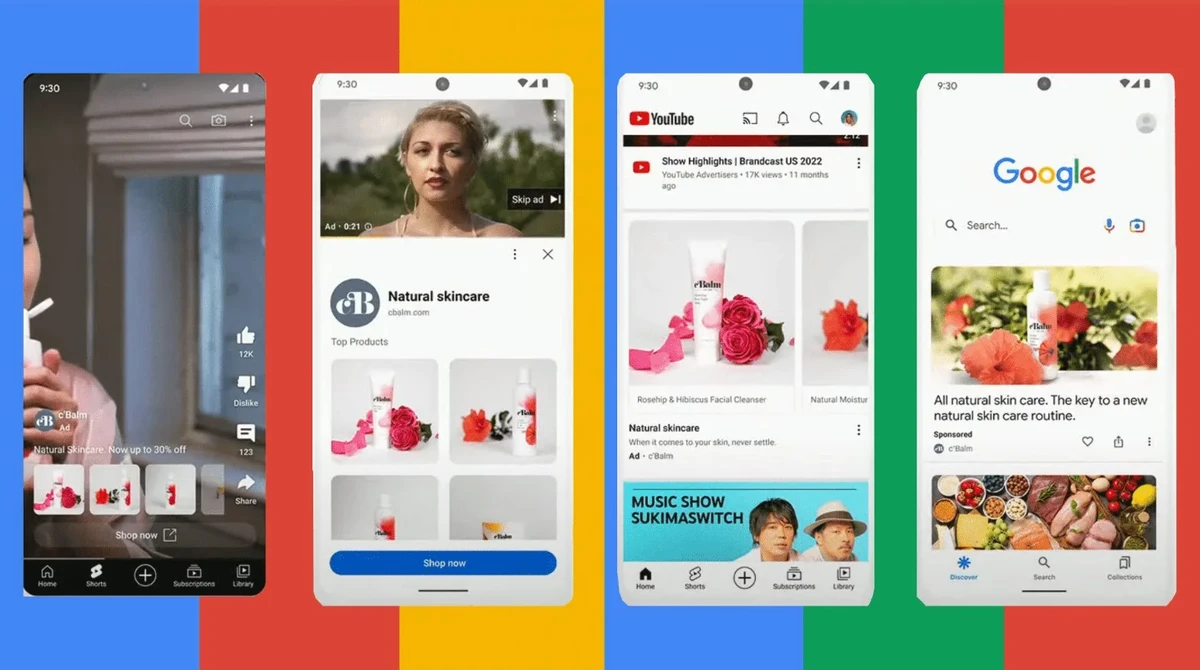
    Leverage YouTube Shorts Ads for Emerging Trends

  • Create vertical, catchy short videos.
  • Target younger demographics consuming short-form content.
  • Measure impact on both Shorts views and overall channel engagement.
  • Combine Organic Video SEO with Paid Promotions

  • Optimize video titles, descriptions, and tags for discoverability.
  • Use paid ads to jumpstart views then reinforce organic reach.
  • Engage with viewers through comments to foster community.
  • Use Custom Audiences and Remarketing to Boost ROI

  • Retarget viewers who watched 75% or more of your video.
  • Develop lookalike audiences based on high-value users.
  • Customize messaging for different audience segments.
  • Understand Google Ads Transparency Center

  • Use it to monitor your ad approval status and advertiser verification.
  • Ensure compliance to maintain long-term campaign effectiveness.
  • Time Your Campaigns with Trending Topics or Launch Events

  • Align video promotions with product launches, holidays, or viral trends.
  • Use Masthead ads for high-impact campaigns during peak traffic.
  • Alternative Methods for Promoting YouTube Videos
    alternative-methods-for-promoting-youtube-videos - How Google Advertising Boosts YouTube Video Reach Fast

    While Google Ads is primary for video promotion, consider these alternatives:

  • Collaborations with Influencers: Cross-promote videos through creator partnerships.
  • Social Media Advertising: Facebook, Instagram, TikTok video ads targeting similar demographics.
  • Organic Growth Strategies: SEO optimization, playlists, end screens, and community posts.
  • Email Marketing with Video Embeds: Drive existing audiences to your YouTube content.
  • Combining paid and organic methods diversifies traffic sources and stabilizes growth.

    Testing and Validation: Ensuring Campaign Success
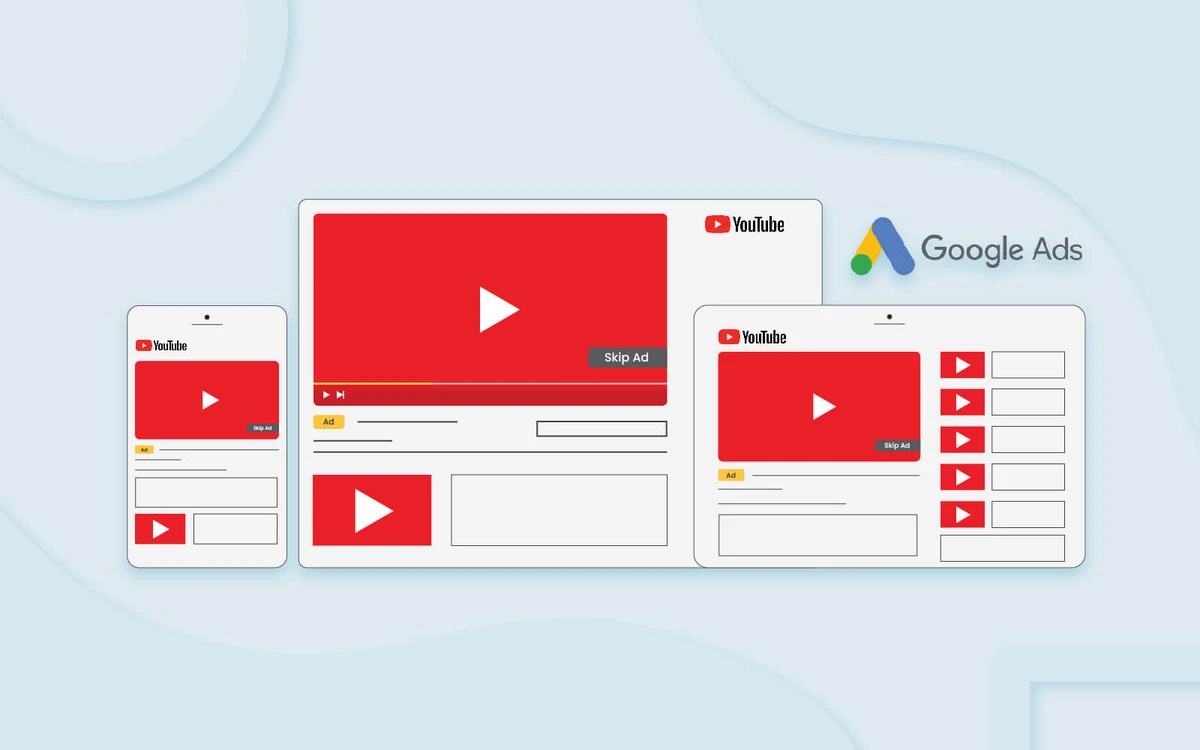
    testing-and-validation-ensuring-campaign-success - How Google Advertising Boosts YouTube Video Reach Fast

    After launch, validate if your campaign is on track:

  • Use Google Ads preview tool to see how ads appear.
  • Confirm tracking pixels and conversions fire correctly.
  • Monitor early performance data (first 48-72 hours critical).
  • Adjust targeting or creatives if key performance indicators are off.
  • Continue testing variations and iterate based on measurable outcomes to achieve sustained success.

    Promoting your YouTube videos with Google Ads in 2025 ensures broad audience reach with precise targeting, optimized video formats, and data-driven campaign management. By following this step-by-step guide, you can confidently link your channel, select fitting campaign types, define detailed targeting, launch your ads, and troubleshoot common issues effectively. Always couple paid advertising with organic growth tactics while adhering to transparency and compliance policies outlined by Google. Experiment regularly and optimize based on performance insights to maximize your YouTube promotion success.

    For more information and advanced tutorials, consult the Google Ads Help Center, YouTube’s official channel promotion guidelines, and industry reports from Kantar US Context Lab that provide comprehensive video ad performance benchmarks. Use available tools like Google Analytics and Ads Transparency Center to maintain trust and accountability throughout your campaigns.

    Starting your first YouTube video promotion campaign today can accelerate your channel growth and open new opportunities in the evolving digital video ecosystem.

    Additional Resources / Next Steps:

  • [Google Ads Help Center: Video Campaigns](https://support.google.com/google-ads/topic/3119115)
  • [YouTube Creator Academy: Promote Your Videos](https://creatoracademy.youtube.com/page/lesson/promote-your-videos)
  • [Google Ads Transparency Center](https://ads.google.com/transparency)
  • [Kantar Reports on Digital Video Effectiveness](https://www.kantar.com/expertise/media-and-digital)
  • YouTube Studio for Analytics: Monitor campaign impact and audience insights
  • Google Analytics for comprehensive conversion tracking and ROI analysis
  • Advertisement

    Leave a Comment